|
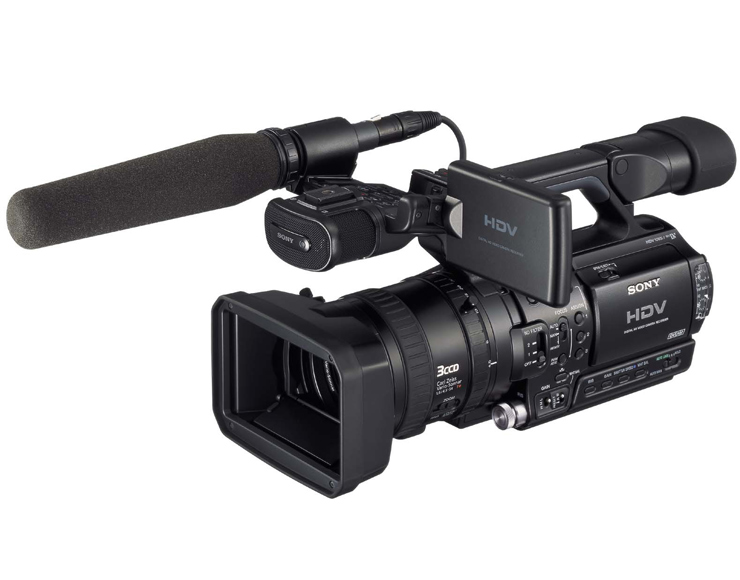
HDV專業高解像數碼手提攝錄機HVR-Z1
發佈日期 : 2004年
12月10日
技術資料
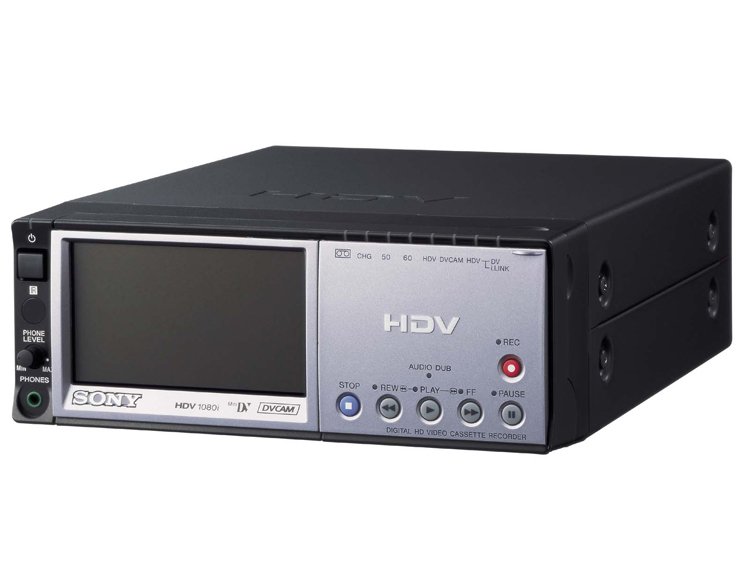
以下資料是有關Sony HDV專業高解像數碼手提攝錄機HVR-Z1的主要技術、規格及優越的專業功能。
支援DVCAM
HVR系列支援DVCAM?及DV格式,並全面兼容現有DV格式的標準解像。
用戶以DVCAM或DV模式拍攝,亦可選擇以16比9或4比3的操作模式。
可轉換的60i/50i
HVR-Z1的獨特之處在於它能夠以60i或50i拍攝HDV高解像及DVCAM影像,
30, 25 or 24 frames per second無論標準訊號或高解像訊號均可。
可轉換的60i/50i令專業用戶
capability is an advantage for anyone who
needs to satisfy clients in both 60i/50i and NTSC/PAL HD and
SD applications
在世界各地都可以進行影片製作,而無需準備兩部支援不同制式的手提攝錄機。
色彩調校
色彩調校功能讓用戶可調節主體的色彩,而不會影響其他物件的顏色。
此功能可營造特別效果,例如在黑白畫面上顯示一個紅色蘋果。
用戶可選擇共兩種目標顏色,而每種目標顏色的色彩變化、色彩變化幅度、色彩增益及膚色度都可調節。
DVCAM Support
The DVCAM and DV formats are supported by the HVR Series to
offer full backward compatibility
with the standard definition DV world. Users
can also select 16:9 and 4:3 modes both for DVCAM and DV operation.
多功能時間碼預設 /用戶自訂操作功能
時間碼預設 /用戶自訂操作功能讓用戶可選定任何時間作為時間碼的開始。
此外,用戶亦可選擇「DF」或 「NDF」,「錄影運行」或「自由運行」,
及「重新設定」或「預設」作為時間碼預設。
多重自訂
操控按鈕功能
HVR-Z1有6個自訂操控按鈕而HDR-FX1則只有3個。可用作自訂操控按鈕的功能包括「自動曝光超馳」、
「白平衡戶外水平轉移」、「超級增益」、「全掃描模式」、「背光」、「射燈」及「錄影回帶」,
全都顯示於HVR-Z1的操控選項菜單上供用戶自行選擇。
觀景器可選擇黑白或彩色
用戶可選擇觀景器以黑白或彩色顯示。
LCD液晶體顯示屏及觀景器同時操作
該HDV高解像數碼手提攝錄機的LCD液晶體顯示屏及觀景器可同時操作。
用戶可透過「觀景器開關」的選項菜單上選擇「LCD液晶體顯示屏」或「觀景器啟動」。
如果選擇「自動」模式,觀景器則只會在LCD 液晶體顯示屏關閉時啟動,而選擇「啟動」時,
LCD晶體顯示屏及觀景器便可同一時間操作。
全顯示掃描模式
「全顯示掃描模式」的功能與其他高級攝錄機的「外框掃描模式」相近。
當用戶將影像應用於網絡之前而需檢查影像質素時,這個功能便能發揮很大的作用。
不過,與其他高級攝錄機的「外框掃描模式」不同之處,是HVR-Z1的HV blanking
部份不會顯示出來。
自動曝光超馳
當採用自動光圈模式時,以光圈撥號盤可轉變自動曝光。
這功能令用戶可輕易地調節光圈(或將增益設定為自動時,用戶可輕易地調節增益)。
黑色延伸
黑色延伸功能令影像的黑色部份顯得清晰細緻。
4:3輸出
HVR-Z1提供多個有效功能以滿足採用4比3模式製作影片的攝製人士之需要。
已轉變的標準訊號輸出 ( i.LINK輸出、S視頻輸出或視頻輸出) 可與兼容標準訊號的產品接駁使用。
當顯示屏為4比3模式時,用戶可選擇「Letter Box」﹔而使用16比9顯示模式時,用戶可選擇「Squeeze」。
4比3顯示模式的邊緣剪裁功能
HVR-Z1具備獨有的「邊緣剪裁」模式,最適合用作拍攝16:94比3顯示模式的影片,
而它與「Letter Box」及「Squeeze」的不同在於它能提供一個符合4比3屏幕比例的正常畫面。
為支援此功能,選項菜單加入選擇觀景器/ LCD液晶體顯示屏4比3安全框顯示。
Setup Level Select
Setup level can be selected between 0% and 7.5% when the camcorder
is operated in SD mode.
This function is available only in NTSC mode.
AF Assist
Auto Focus Assist function allows the user to control the
focus while in auto focus mode.
This function is very useful for "touching
up" the focus if needed.
External Record Control
External devices such as VTRs or HDD recorders can be controlled
via i.LINK.
"Rec Control Mode" menu and "Stand-by
Command" menu are in the "External Rec Control"
menu.
"Rec Control Mode" menu can control
"Synchronous" or "Relay." "Synchronous"
starts the recording process in both the external
device and the camcorder. And "Relay"
starts the external device when the camcorder is stopped.
"Stand-by Command" menu can be
selected as "Rec Pause" or "Stop."
"Rec Pause" can trigger to the external device when
Rec Pause button is pushed.
White Balance Outdoor Level Shift
When the white balance is selected in "Outdoor"
mode, it can be shifted (-7~0-+7) either through the menu
or Assign Button. This feature allows the user to adjust the
white balance with fixed color temperature.
Hyper Gain
Hyper gain (more than 18 dB) enables image acquisition in
extreme low-light conditions, even less than 3 lux.
All Display Off
Display mode can be selected if the "Display" function
is assigned. In the "All Display Off" mode, only
mode status on the LCD panel or viewfinder is shown.
Zoom Display Selectable
Zoom display type can be selected by "Bar" or "Number."
When "Number" is selected, it will be displayed
from "0" to "99" following the zoom position.
This is useful for remembering the zoom position with an actual
number.
Selectable Peaking Level and Color
Peaking color and level can be selected. Color can be selected
from "White," "Red" and "Yellow,"
and "Level" can be selected from "High,"
"Middle" and "Low." On the HDR-FX1, it
is fixed as White and Middle.
Expanded Focus Off Mode
Expand focus can be changed to normal with two selections:
"Auto Off" and "Manual Off." In addition
to the "Auto Off" mode provided on the HDV consumer
camcorder, "Manual Off" mode is added for the HVR-Z1.
When "Manual Off" is selected, the expanded focus
will change to normal when the Expand Focus button is pushed
again.
Safety Zone and 4:3 Marker
"Safety Zone" and "4:3 Marker" are added
in the Marker menu, in addition to the "Center Marker"
on the HDV consumer camcorder. "Safety zone" displays
the inner area of the screen and "4:3 Marker" displays
the 4:3 area in order to define picture width when the shot
is used both for 16:9 and 4:3 display. All markers can be
displayed simultaneously.
Date and Time Stamp
Date and Time can be recorded on the tape, useful for applications
such as surveillance or legal documentation where time and
date notation need to be permanently shown on the image.
XLR Connectors and Mic Power Supply
Two XLR connectors are provided and a built-in stereo microphone
is standard. Mic Phantom power is supplied via XLR connectors.
Independent Audio Record Level Set
Each channel of audio record level can be controlled independently.
Two audio record level volume controls are at the back of
the camcorder, compared with one volume control on the consumer
camcorder.
Audio Monitoring
Various modes are available for audio monitoring, such as
Ch1 and Ch2, Ch1 only, Ch2 only and Ch1+Ch2 (Mixed).
Microphone Setting
Wind noise reduction can be selected independently for the
built-in stereo microphones also on either XLR input. The
sensitivity of the internal stereo microphone can be selected
as "Normal" and "High." XLRs can be selected
as independent channels (XLR1 to Ch1 and XLR2 to Ch2) or monaural
(XLR1 to Ch1+Ch2). XLR also has a setting of "AGC Link"
On and Off, and it can select linked AGC for XLR1 and XLR2.
Each XLR input allows the selection of input level as Mic
or Line, as well as Trim level in order to adjust input to
the audio circuit and prevent overload (-18, -12, -6, 0, +6,
+12dB can be selected).
Audio Mode
32 KHz and 48 KHz can be selected when the Rec Mode is set
to either DVCAM or DV SP. When HDV is selected, audio is always
48 KHz and it is compressed with MPEG1 Layer2.
Audio Lock
Audio Lock mode or Unlock mode can be selected when the Rec
mode is set to DV SP. When HDV is selected, Audio is unlocked.
When DVCAM is selected, audio is locked.
Audio Limiter
Audio Limiter On and Off can be selected. With the HDV consumer
camcorder, the audio limiter is always on.
Mic Noise Reduction
Mic noise reduction can be selected On or Off. When it is
On, a reversed wave of mechanical noise is generated and cancels
the mechanical noise.
Wind Noise Reduction
Wind Noise Reduction is available for internal microphones,
and also independently for each XLR input.
Mic Select
The built-in standard stereo microphone allows users to select
"Internal Mic" or External Mic with XLR.
Internal Mic Sensitivity
Internal stereo mic sensitivity can be selected as "Normal"
or "High." "Normal" is commonly used for
professional applications. Only the "High" level
is supported for the HDV consumer camcorder.
CineFrame Mode
The HVR-Z1 offers several options for "cine-like"
shooting in three modes: 30 frames, 25 frames and 26 frames.
Additional CinemaTone? and Gamma Settings
Two types of CinemaTone? Gamma can be selected both for 50i
and 60i in HDV, DVCAM and DV.
Shot Transition? Start Timer
This sets the delay time for the start of Shot Transition?.
Shot Transition? can be started simply by pushing the start
button. The start timer has a selectable 5-, 10- or 20-second
delay to prevent camcorder movement during shots.
Skin Tone Detail Level control
Skin tone level can be selected as "High," "Middle"
and "Low," in addition to the skin tone Type. Skin
tone level can change the "Detail" level of skin
tone.
480p Output for SD Component Output
"480i," "480p/480i" or "1080i/480i"
can be selected as the analog component output. "480p/480i"
is also available with the HVR series.
Smooth Handle Zoom
Smooth Start and Smooth Stop are provided on the handle zoom,
to enable manual zooming for professionals.
Audio Output Select
Audio output can be selected as "1Vrms" or "2Vrms."
"2Vrms" is usually used as the professional output
level.
Select Audio Mode at i.LINK Down Convert
"Lock mode" or "Unlock mode" can be selected
as the output of the i.LINK when it is down-converted to a
DV stream.
Selectable SMPTE Color Bars
Two types of color bars are provided. Color bar menu can be
assigned on the assign button and selected color bar can be
displayed when the assign button is pushed.
Hours Meter
Hours Meter for Operation, Drum Run, Tape Run and Threading
time are provided.其他優點如下:
麥克風輸入設定
裝置水平選擇
AF輔助
外置錄影控制
白平衡戶外水平轉移
超級增益
全部顯示關閉
快速錄影
變焦比率的數值顯示
可選擇最高水平及顏色
擴展對焦關閉模式
安全區域及4比3安全框顯示
日期顯示錄影
音頻控制選擇
音量限制器
減噪功能
減風噪音功能
內置麥克風上的敏感度選擇
2組Cinematone Gamma模式
開始拍攝過場效果功能計時器
膚色水平控制
480p輸出 (模擬色差訊號)
流暢手動變焦
音效輸出水平選擇
2種色板模式
小時量度器
附送AC變壓器/充電器 (AC-VQ850)
 
謝謝收看這篇文章,你是第
個收看這篇文章的讀者。
|





